Archive for June, 2012

What a week it has been if you follow MSFT Technology stack! First, the innovation we saw in the MSFT Surface. Today, it was the turn for Windows Phone Summit to lay down the what MSFT had in works for the future of the Windows Phone ecosystem.

Love it or hate it – you cannot deny, as a technologists, that relentless innovation from competing companies is what pushes our tech industry forward. Here are my 2 little cents on the Windows Phone announcements:

[Recently at a conference, I learnt from Jay Harris that "Bullets Kill People" :) . Bullets are meant for guns & not presentations/blog posts. Sorry Jay, it was just quick this one time .. hoping you don't see this! Moving forward, I promise ...]

  • The One Ecosystem – First, in my opinion, Windows Phone 8 looks very very good; it delivers on everything we were expecting as enthusiasts. Most importantly, it draws from the power of Windows .. the NT Core stack for networking, file system, security & overall stability/performance. This was expected; but not a trivial ask ripping out the core underlying the 2 year old Windows Phone OS. This has positive implications written all over it .. the combo of Windows 8 & Windows Phone 8 sharing guts is going to make for brilliant opportunities. Just better together!
  • First Loves – Here are things I absolutely loved about the direction in Windows Phone 8 platform, as a consumer: Sharper high-res screens, Wallet, NFC, Expandable storage, Nokia maps & IE 10 rendering engine. Oh, and OTA is for the win!
  • Developer, Developer, Developer – Every tech giant knows who their best friends are; so no wonder developers need to be wooed. Here’s what I will be looking forward to in the next Windows Phone SDK: Native code support (Not smart enough to do myself yet; but this will be huge), In-App purchases (Thank You!), VoIP and Wallet API integrations. How do we make Digital coupons or use NFC APIs? Let’s hope the SDK lands soon .. can we have a BUILD please? Now, the real interesting thing would be the SDK. Would I be able to target both 7.5 & 8 from VS 2012 templates? What percent of us WPDevs would start jumping on the WP8 bandwagon, given most user base is on present generation & might not switch until their next phone? Let’s hope the transition would be smooth for devs ..
  • Buyer’s Remorse – Now, the bittersweet. Would you agree that in today’s age, we live with constant buyer’s remorse, specially with gadgets? So, Windows Phone 8 OS would NOT run on present hardware devices. Somewhat awkward, but really not much way around. Shooting from the hip here, but given generation shift in technology between Windows CE Kernel & NT Core, I would imagine it would be very difficult, if not impossible, to flash smartphone ROMs that close to metal. So, there. Now, all three of Apple, MSFT & Google are refreshing their mobile OS big time every year. So, in practicality, we are being enticed to buy new hardware every year! Unfortunate, yes .. but let’s set aside budget, shall we? As Rob Gibbens mentioned, would you want to pay a little more upfront for a phone, given a 1 year contract? Thankfully, there would be Windows Phone 7.8 that would be pushed out to present phones, to bring you the advancements of the new Start Screen experience.
  • Start – So, there is a somewhat new Windows Phone Start screen experience. See the wonderful video HERE. Live Tiles & pinnable content is one of the most loved Windows Phone features among users; so, nice to see this being pushed forward further. Live Tiles would come in 3 customizable sizes & various colors – so your phone is distinctly you! Personally, I somehow liked the little right arrow & the breathing space to the right in present generation Windows Phones – I think it’s aesthetic; most think it is wastage of valuable screen real estate. Guess I’m alone & we shall see how the new Start experience feels in hand. Clutter is uncalled for .. so may be we can be sparing in placement of the customized smallest Tiles.
  • Enterprise Features – Encryption, Security, Remote Wipe & Company Hubs – Love it!

Overall, I am pretty excited about the announcements at Windows Phone Summit. The future of Windows Phone ecosystem is in good hands and Windows 8 will only help propel adoption. In fact, starting this Fall, between the Phone, the PC & the XBox – the MSFT ecosystem is pretty darn difficult to not get excited for. And we are just getting started .. let’s see all that is in store for developers! We win as one :)

Adios!

Sunday afternoon ..

Grilled turkey burgers for lunch + wife busy with dissertation = Full & ready to crank out some solid code for a few hours. I rub my hands and sit down to knock off a pending project work. At hand, is a Windows 8 Release Preview Metro app that we are building for a client. Traditional technician-out-with-a-tablet setup; so offline access & later data sync with server DB is called for. The immediate answer is OData, as a service on top of backend Database .. seamlessly & asynchronously read/write data through plain HTTP. I have done OData CRUD numerous times in Windows Phone, web or Silverlight .. this should be a piece of cake!

Yeah, right .. what ensued was a few hours of frustration, trying to stitch together the moving pieces & beta software hurdles to overcome. So, here’s my attempt to save someone a few hours .. don’t you love writing blog posts which will be obsolete in a few weeks? :) Here’s the tale:

  • First, the data store. Simple relational data. SQL Azure DB with appropriate Tables. Done.
  • Next, expose the data through an OData service layer. SQL Azure Labs had this one click approach to setting up an OData service on top of existing DBs; not sure when that is coming back. So, custom service it is. Two step process to produce an OData service: ADO.NET Entity Data Model (EDM) pointed to DB Tables + WCF Data Service exposing the generated entities. If you need to do full CRUD, make sure you are configuring each entity with the right permissions.
  • Host the service in IIS, test & host in Azure. Done.
  • Next, integrate in Windows 8 RP Metro app .. should have been simple if I had known what was supported. By the way, if you started writing your Metro app in Consumer Preview in XAML/C#, you’ll find a sleepless night with breaking changes in Release Preview. Expected, but awkward. Just restart fresh project & port over artifacts.
  • Turns out, I had gone HERE to get Windows 8 RP. Right next to the RP ISO is the link to download the Dev tools, which happen to be VS 2012 Express for Windows 8. Point is, know what you are running.
  • Next, grab OData service URL & hope against hope that Add Service Reference would work .. well, it didn’t. Turns out, not supported in VS 2012 Express.
  • No problemo .. been there. So, immediately revert back to the DataSvcUtil.exe tool for Proxy generation. Yup works just fine in .NET 4.5. Check out THIS post if you need the steps.
  • Grab the generated proxy file & drop in VS project. Voila, you have references to your OData entities in code. One problem — can’t easily work with them!
  • The issue is, Windows 8 Metro apps written on top on WinRT would not allow you to add references to two super-useful class libraries — System.Data & System.Data.Services.Client. These two are the key to working easily with an OData service. Without them, you’ll be left hand-coding the HTTP requests .. Yuck!
  • Has no one figured out a way? Well, sure .. and it is Phani Raju from MSFT. The very person whose bits we’re seeing in present VS 2012 RC. Check out his POST explaining how to consume the Netflix OData feed.
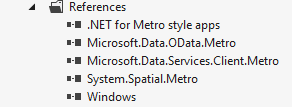
  • Upon download of the sample code, you should see the following DLL references in the project:

    References Libraries

  • So, in addition to our generated proxy, could we just grab these DLLs & call it a day? Well, sure it compiles and we can use DataServiceContext/DataServiceCollection; but you get runtime exceptions around Type initializers. Closer reading of Phani’s post & comments reveal that the bits have changed some & not compatible with VS 2012 RC any more. Updated libraries have been shipped; but as a part of VS 2012 RC Ultimate!
  • Aha, so that’s a problem .. Adding a Service Reference is not yet supported in the VS 2012 RC Express for Windows 8 Metro apps only; we need to get the Ultimate edition from HERE.
  • One caveat – Do not install VS Ultimate on top of the Windows 8 Metro Express version; references still seemed broken. So, uninstall what you have & get the fresh full copy of VS 2012 RC Ultimate.
  • Now, you should be set. And guess what, no more manual proxy generation or dropping DLLs. Simply grab the URL of your WCF/OData service and do Add Service Reference. Should work.
  • And when you do successfully add reference, take a look at your project references .. yep, it has added back the same 3 DLLs we saw above; only with updated bits. Voila!
  • And now, you can add references to System.Data & System.Data.Services.Client in your code. These seem to be non-accessible by default; upon service addition, the newly dropped DLLs open up these namespaces.
  • That’s it: Now you can create a DataServiceCollection to pull down your OData entities and do full CRUD operations, if allowed by the data source. See this POST if you need pointers on how to do CRUD against OData.

Pretty simple in the end. Just that when you are dealing with beta software, you may have to tinkle around little bit. Hopefully, this can save someone a little time .. to go enjoy summer. But also, go ahead and add cloud/service support to your Windows 8 Metro apps!

Adios!