Red Pill or Blue Pill? Choosing Between SQL & NoSQL

Pain is often the stimulus behind innovations. This is particularly true in software development, in what we endearingly call Pain Driven Development (PDD). Starting from the 1980s, we have all known how to handle relational data – simply put it in a Relational DataBase Management System (RDBMS) and use SQL to work with the data. For the past few years however, our industry has seen an increasing trend towards the usage of NoSQL databases, where data just isn’t stored like in relational databases.

Yes, thousands of internet debates are dedicated to the SQL vs NoSQL fight. But does it have to be a fight? If you are choosing one over the other, do you know for sure why and what the potential benefits of each are? This article is a run-down of most common benefits and pitfalls of both SQL and NoSQL approaches, including simple comparisons and developer to developer considerations. There is no right or wrong; as usual, the classic answer stands true – it depends.

Full article HERE.

What to Expect When Expecting MVC 6

The landscape for .NET developers has seen some exciting changes of late. As you may have already heard, the .NET Framework Core has been Open Sourced. The future of .NET is modular, cross-platform and rather interesting.

ASP.NET vNext leads the way and is a modern modular web framework, written from ground up, for powering the next generation of web applications. Now, you may be hearing a lot of interesting things about ASP.NET 5, like how you can now build and run ASP.NET applications natively on OSX or Linux. But what about the future of regular enterprise web applications built with ASP.NET MVC? What are some key changes to look forward to as MVC 6 rolls around?

In this article I offer an honest simple rundown of the major features that you can start leveraging from the get-go. There’s no code, just helpful resources. So, at the risk of killing you with bullets, let’s summarize what you should be expecting with ASP.NET MVC 6 ..

Full article HERE.

Easy Authentication for Web Applications Using Live Connect

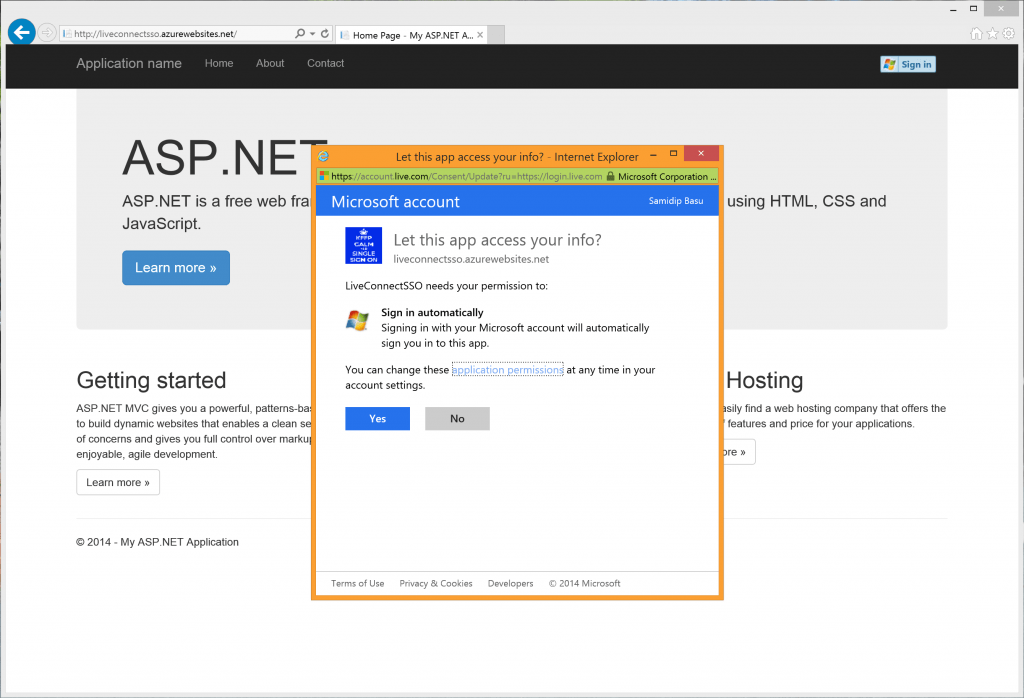
Do you have a Microsoft account? Yes, the same consolidated account that powers your Outlook email/contacts/calendars, OneDrive, Xbox, Windows 8 and Windows Phone devices, along with a slew of other Microsoft services. Millions of people do. Chances are, your application’s users probably also have a Microsoft account. This presents a potential opportunity. Live Services is what powers many facets of your Microsoft account, like profile information, contacts, calendars and OneDrive. These services are very familiar for many users, and when you’re able to leverage these same services, users can feel right at home within your application. EnterΒ Live Connect APIs, which are a thin layer of RESTful services on top of Live Services that allows developers to integrate Live Services into their applications. This is possible from any type of application – web, whether desktop or mobile, and across any platform. In this article, we’ll take a quick look at Live Connect APIs and then a deep-dive into using them for user authentication within a web application.

Full article HERE.