What’s Next for Windows Phone

Wow! I had to begin with that word. The 2nd day’s Keynote at Mix11 Conference has to be the best of Microsoft we have seen in recent times. Now, obviously I would be biased with all the good stuff, being a Silverlight & Windows Phone 7 enthusiast. But just for reference, an iOS developer friend was watching the Keynote with me and he said-“Damn, that’s good stuff!”.

Now, a lot of cool things were announced in the Day 2 Keynote – things like Silverlight5 & Kinect SDK; not to mention free Kinects for attendees! I just wanted to recap on the Windows Phone enhancements and what they might mean for us developers:

  • Increased Reach – Our WP7 apps will start having a bigger audience with Window Phone Marketplace being available in 35 countries, up from 16 right now. However, MSFT also announced upcoming support for 16 new languages, including Asian ones, which they seemed to be testing for aesthetics right now. A huge majority of apps right now in the Marketplace are in English though; as we reach a broader user base throughout the world, we developers need to think about offering a more native app experience through localization.
  • App Search Enhancements – I guess this was due and a few leaked Mango builds had indicated this was coming. With increased number of apps users install, the long alphabetical scrolling list of apps was just not optimal. Enter Search capabilities in the next update, which should help users use suggestions as they search for apps. This search also taps into the Marketplace with deep-linking of suggested apps; this is awesome for the discoverability of our apps. There is also the added support for the all-familiar Jumplists for searching for apps with the beginning letter.
  • IE9 – As JoeB mentioned, IE9 on the Windows Phone will have the exact same rendering engine as that on a PC. Now, does not mean that we do not need mobile web targeting the phone form factor; smartphones still have a small GPU & memory. But with HTML5 & the same rendering mechanism, differences in regular & mobile websites will start to shrink. The demo showing how the phone uses the audio/video tags of HTML5 to keep media running in the background is phenomenal. So, I think this will be a huge scale-tipper for enterprises looking to have a single unified mobile web presence. Web developers FTW!
  • APIs – There are north of 1500 new APIs in the Mango toolset. 1500 !! This includes a gamut of ways we developers get to tap into the phone’s motion sensors, camera & audio among other things. I do not know much; but believe the augmented reality folks are rubbing hands in anticipation.
  • Toolsets – This to me is mind-blowing, given that WP7 development IDEs are among the best any mobile developer can get. The app Profiler should be very cool if it lives up to what was demoed. A lot of WP7 apps, including few of mine, could use performance tuning. We developers have got to understand the nuances of coding for a small device; repercussions of choices on UI, component & background threads.
  • Multitasking – This combined with fast app switching, should be something I would rejoice with as an user. However, I am a little wary of how things are laid down in the development tools around the existing ways of tombstoning. How does the OS soft-suspend an app? What are the expectations off the developer? I hope as the Mango toolsets are released, we shall see more guidelines from the product team on how they envision this unfold.
  • Notifications – This is a good one too. I was running a WP7 dev session & somewhat asked why is it that a Push is needed to update a Live Tile. If the user has a shopping list app & marks things off, all the current data is on the phone. Why then do we need to make a service/MPNS round-trip to update the Live tile? Well MSFT seems to have gotten the feedback as well. Enter Background Notifications, Live Agents and multiple Tiles per app with deep linking. Again, we will have to see how the implementations work out and how we may have to adjust future apps.
  • SQLCE & IRC – I am not an expert on either of these topics; but seemed like good stuff. I think I have the seen the community provides toolkits & ways to get around these limitations in the past. Good to know that they are right out of the box in Mango.
  • Emulator – Again, this is freaking awesome. How many times have we wondered if there was an easy way to simulate accelerometer & location data on the WP7 Emulator? Well, wait no more with the Mango toolsets. The fact that Bing locations services can be used to set up to provide a chain of location data to the emulator apps is phenomenal.
  • Silverlight & XNA – This is something I have personally not missed; but I have heard from multiple XNA folks that they would like to bring 3D modeling to the Silverlight apps. And, so it happened!

Yes, I know what you thinking. This is a fanboyish post with all praise! Kinda true .. haha. There were a few missing pieces that were rumored – Silverlight5 on WP7 & Silverlight runtime for the Xbox ecosystem. True – but a lot of right steps were taken today and as a Windows Phone developer, we should take to heart the commitment to the future of this ecosystem. As Matt said in this post (here), luck happens more often to folks who plan & prepare. Share the love, as every developer matters.

Adios!
WP7: Say hello to OData from SQLAzure

Let’s face it. Windows Azure & Windows Phone 7 are two of the hottest products out of Redmond for now. After dabbling around for a couple of days and reading some great blog posts, I felt somewhat confident to try making WP7 work with Azure. And the dumb me had to bring things down to the lowest simplicity to understand how stuff works; so that’s what I shall be sharing today. Also, I am mostly a dork with Azure; I am trying to learn with the bootcamp materials in spare time. So, huge shout-out to Azure MVP Michael Collier (@MichaleCollier) for helping me around Azure.

OData“(Open Data Protocol) seems to be an extremely versatile open standard for sharing & updating data. The seamless exposition of pure data over HTTP through Atom/Jason has to be exciting, as are the filtering & pagination options. Head over here to learn more about the OData standard, producers, consumers and what it means for developers. Now, OData can act as the perfect bridge between Azure cloud data & a client application on the Windows Phone, as we shall see. The needed steps to try this out first hand are laid down in the points below:

  • First, we want to get access to Azure. There are free trials you can sign up for here or reach out to one of the Azure MVPs for an Azure Pass. The tokens might take a day or two to activate; but the free instances/storage should be plenty for trying out things.
  • Next, we focus on data. If you have any SQL Server data source, it can be exposed through an OData feed for reads/updates. Michael Crump(@mbcrump) wrote a  brilliantly detailed post here on how to set up an OData source.
  • However, if you intend to move your relational data up onto the cloud, you are in for a pleasant surprise. SQL Azure, I think, makes it super easy to handle Databases and table relationships. And, once your data is in SQL Azure, OData feeds should come free with one-click of a checkbox! Really neat!
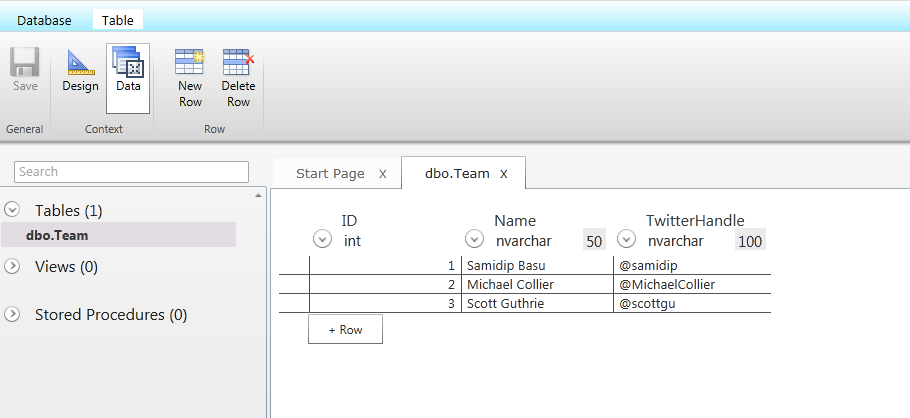
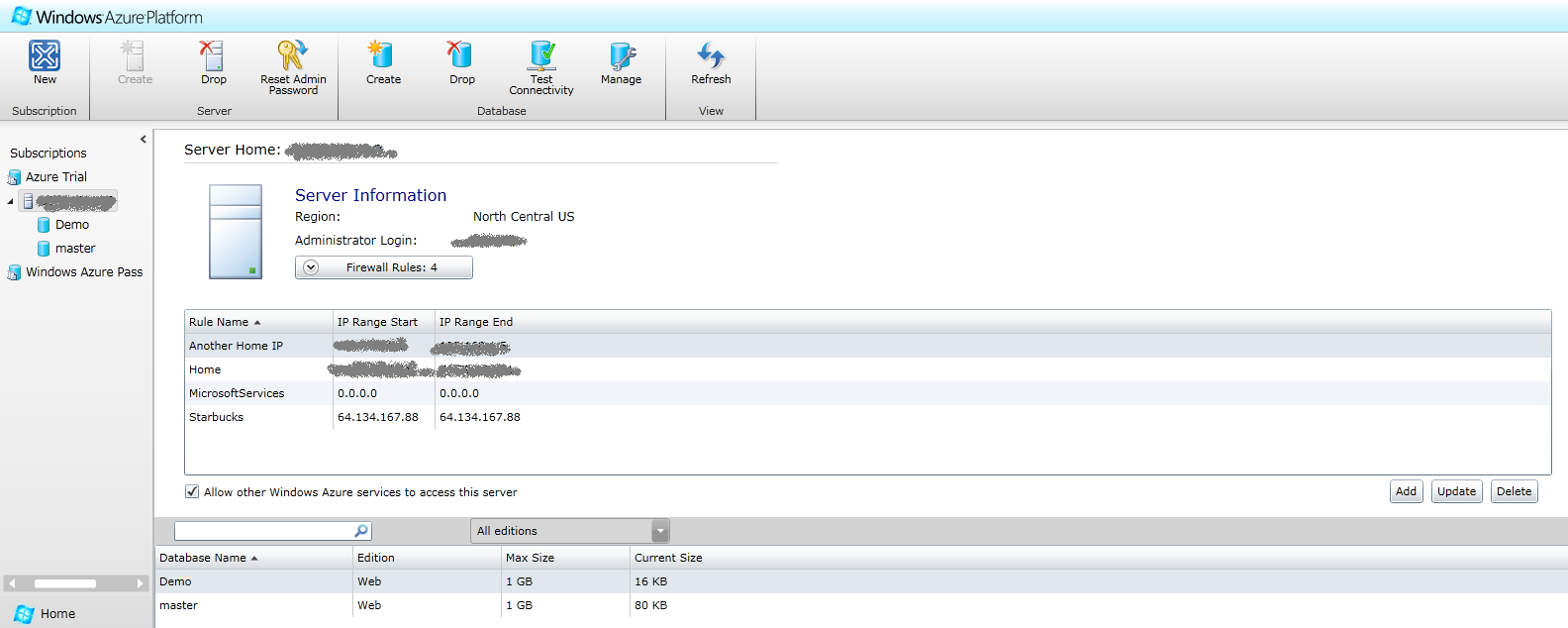
  • So, once we have our Azure access set up, we head over to the Silverlight Azure portal here. We make sure our Subscriptions are active and that we are not consuming beyond our quota. Next, we click on the “Database” tab, select the appropriate Subscription & create a new “SQL Azure Server“. Please note, as pointed out by @MichaelCollier, this is not a SQL Server; rather an Azure endpoint with infrastructure hidden under the covers. Setting up the SQL Azure server involves setting up your Admin rights, DataCenter region & firewall settings, so you get to control which IPs can hit the server. Next, we proceed to create an actual DB within that SQLAzure server; this & a host of other DB management tasks are easily accomplished with the toolbars at the top. Once in DB management mode, it is incredibly easy to manage tables, their schema & actual data in the tables.  Hopefully the illustrations below capture what you see & will need to do in order to get your DB set up.

SqlAzureDBView

SqlAzureTableView

Now, for this demo, we will simply use the Web UI to create a DB called “Demo” and within it, create a table called “Team” with three simply data columns. We also, for the sake of the demo, fill up the table with some data. Obviously, this is not the way one would get data into the SQL Azure tables; but we are just trying to prove a point. And yes, I am pretending that we are in the same team as Scott … bwa ha ha!

  • So, now we have our data source. What if we wanted to share the data as an OData feed for consumption? No worries! We head over to SQL Azure Labs here and sign in with the same Live ID that is tied to the Azure Pass that was used previously to host the DB. Next, we pick the appropriate SQL Azure server & the Database. Do you notice a little checkbox below the DB selection? Aha, that, my friend, is all you need to do to share the DB contents as OData! The following illustration shows the SQL Azure Labs screen with the OData option.

SqlAzureLab

We need to make sure the DB can be targeted by any user without authentication, for demo purposes. This setting gets us a unique public URI, the OData doorway to your SQL Azure data! Make sure to take a note of the URL (after checking it works in the browser) as we shall need it in the Windows Phone app. That’s it, we are done in Azure!

  • Our OData feed is at the URL: https://odata.sqlazurelabs.com/OData.svc/v0.1/<server_name>/Demo. Please note that the URL goes only upto the DB name; we shall drill down further in code.

Now that we have an OData feed out of Azure, the WP7 consumption part is easy and has been blogged about in several posts. Essentially, the Add Service Reference part of consuming the OData endpoint is broken; so we have to revert to a few interim steps.

  • We head over here and download the binaries of the “OData Client Library for WP7“. This essentially abstracts out from you having to parse the OData Atom/XML feed to hydrate your objects; it uses sophisticated data bindings/annotations/reflections to build you a “DataServiceCollection” (read ObservableCollection) that you can easily bind to Silverlight UI elements.
  • The downloaded files provide for a “DataSvcUtil.exe” file that you could point to an OData feed & it will build the proxy classes for you. So, next we fire up a Command prompt, navigate to where we downloaded the libraries, and use the following command:

DataSvcUtil.exe /uri:https://odata.sqlazurelabs.com/OData.svc/v0.1/server_name/Demo /out:TeamModel.cs /Version:2.0 /DataServiceCollection
  • The URI supplied is the same URI we got out of our Azure feed. The out parameter names the proxy file to be created .. cs for C# & vb for VB. The DataServiceCollection option is also important as it sets up your object mappings from the OData data store & also implements the “INotifyPropertyChanged” interface on them. This is what the Observable Collections use for effortless UI binding; just change the underlying object & the UI updates itself. The above command should have created a C# file for us to use in the mentioned directory.
  • Next, we fire up a simple Windows Phone project; again keeping things really simple here to illustrate the point of OData consumption. We need to add a Reference to the “System.Data.Services.Client.dll” found in the OData library directory & also add the generated cs file to our solution.
  • For simplicity, we use the default MainPage.xaml page and do a few tricks while the page loads. Again, placement of code is questionable; but just for the demo, we add this to the Xaml’s code file.

       #region "Data Members"

        readonly DataServiceContext context;
        DataServiceCollection team;

        #endregion

        #region "Constructor"

        public MainPage()
        {
            InitializeComponent();

            // Instantiate the context.
            context = new DataServiceContext(new Uri("https://odata.sqlazurelabs.com/OData.svc/v0.1/server_name/Demo"));
            this.LoadTeam();
        }

        #endregion

        #region "Methods"

        public void LoadTeam()
        {           
            // Instantiate Team collection.
            team = new DataServiceCollection(context);

            // Custom URI, filters possible.
            Uri uriQuery = new Uri("/Teams()", UriKind.Relative);

            // Asynchronously load the result of the query.
            team.LoadAsync(uriQuery);

            team.LoadCompleted += (sender, args) =>
            {
                if (args.Error != null)
                {
                    // Oopsie.
                }
                else
                {
                    // Success.
                    this.teamList.ItemsSource = team;
                }
            };
        }


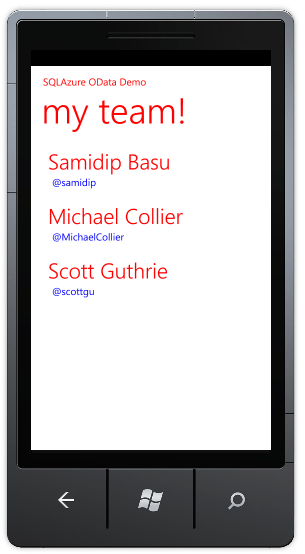
  • Essentially, we create a context using the class from the generated file & point it to the URI of our OData service. We then fire off an asynchronous call to fetch data on a custom URI off the base OData feed. Please note that this is where you can get fancy and use filters or other where clauses to get to exactly the data you need. If hell doesn’t break lose, we should get our feed back and it should hydrate our strongly-typed DataServiceCollection! The Xaml code follows; please note that with the use of a ViewModel pattern as we do for Panorama/Pivot pages, most of this object hydration should happen when the ViewModels are initialized & then UI binding should be automatic. This is what I had whipped up quick; also no fancy progress bars for the demo:

SqlAzureWP7Demo


And, the XAML for binding is this:


          <ListBox Name="teamList" Margin="0,0,-12,0" ItemsSource="{Binding Teams}">
                <ListBox.ItemTemplate>
                    <DataTemplate>
                        <StackPanel Margin="10,0,0,25" Width="432">
                            <TextBlock Text="{Binding Name}" TextWrapping="Wrap" Style="{StaticResource PhoneTextExtraLargeStyle}" Foreground="Red"/>
                            <TextBlock Text="{Binding TwitterHandle}" Foreground="Blue" Margin="20,0,0,0" />
                        </StackPanel>
                    </DataTemplate>
                </ListBox.ItemTemplate>
            </ListBox>

As you can see, our Listbox simply binds to each Team member object & then drills down to display the Name & TwitterHandle. Simple, effective pull of OData from Sql Azure. Wasn’ t this fun?

I think I have a few more demos of using Push Notifications from the cloud, that I will try to blog about eventually. In the meantime, any comments on the above are most welcome. Tell me what I am doing wrong or what could be improved!

Adios!

Watch those Namespaces!

This will be a short post on a common problem to watch out for while parsing XML in the Silverlight Windows Phone 7 world. Just hoping to save someone ½ hour of looking around! Now, the Silverlight run-time on a Windows Phone is based on the .NET compact framework; so you don’t have access to the complete .NET framework & this is for good reasons. There are some things that one just should not do on a smaller device (like synchronous operations that lock up the UI thread); also, the compact framework has been optimized to provide for the special needs of a touch-based form factor.

So, let’s say you are writing an application that consumes an Atom/XML/RSS feed. The “WebClient” or “HTTPWebRequest” classes are what most WP7 developers use to make a web request; although the latter has proven to be better performing (as explained here). The core idea is to fire off an HTTP Get, after assigning an event handler to process the response asynchronously. So, I had the usual code as below:


   WebClient FeedGetter = new WebClient();
   FeedGetter.DownloadStringCompleted += new DownloadStringCompletedEventHandler(Feed_Downloaded);
   FeedGetter.DownloadStringAsync(new Uri("some URI"));

Now, once the response was available, it was a matter of parsing the XML feed. Since we do not have the luxury of XMLDocument in the Silverlight framework, the next best alternative is to use XDocument to build the XML tree for parsing & then use LINQ to XML to hydrate needed objects. This actually works outs well since LINQ has been shown to performing better than XPath node processing. So, again, I had the usual code in place:


 private void Feed_Downloaded(object sender, DownloadStringCompletedEventArgs e)
 {
    if (e.Error != null)
    {
        // Do something
    }
    else
    {
       // Grab response.
       XDocument xmlFeed = XDocument.Load(new StringReader(e.Result));
                
       // LINQ to parse.
       var someCollection = from xElem in xmlFeed.Elements("SomeNode")
                                          select new someObj
                                           {
                                                Property1 = xElem.Element("childnode1").Value,
                                                Property2 = xElem.Element("childnode2").Value
                                           };

        // Loop through someCollection & stuff.
      }
  }

But, nothing happened! No errors in parsing; yet my objects were null. A little investigation revealed that the LINQ parsing was not working as the “Elements” node collection came back empty! Hmmm .. nothing unusual in code. So, what was causing the failure? Turns out, the XML feed & XDocument were both responsible.

The XML looked like this:


 <Root xmlns:i="http://www.w3.org/2001/XMLSchema-instance" xmlns="someNamespace">
  <childnode1 .... />
  <childnode2 .... />
  ..
  ..
 </Root>

Turns out, since the root node names a “Namespace” explicitly, every node in the tree belongs to that Namespace! And the XDocument method needs the fully qualified XName node name to uniquely find the nodes in the tree. So, the following is the workaround. For repeated use, you might want to use a constant.


  XElement feedNode = xmlFeed.Element("{someNamespace}Root");

Or something like this:


  XName qualifiedNodeName = XName.Get("Root", "someNamespace");
  XElement[] childNodes = xmlFeed.Descendants(qualifiedNodeName);

As an afterthought, while parsing XML through LINQ to hydrate your objects definitely works, it may not be optimal. Recently, on a friend’s advice, I have started using the .NET Serialization classes to do this . Turns out, data annotations, when correctly used are very powerful while deserializing XML/Atom feeds. May be a later post to explain what I mean.

Till then,
Adios!