Holiday Season 2014. I looked around and had several computers around the house – ones that I seldom used. So cleanup ensued and I sold off a Surface, a Macbook Air & an old HP laptop. All that raised cash had to go towards a new toy, right? My bet – the new Lenovo Yoga 3 Pro! I believe this was one of the best OEM innovation attempts and deserved a look. Primary dev machine continues to be a MacBook Pro – this was to be a side ultrabook for light work and staying connected. Here are my thoughts ..
Specs – 8 GB RAM | Intel Core M | 256 GB SSD | Win 8.1 Pro | 13.3″ QHD+ 3200 x 1800 IPS multitouch display.
Pros:
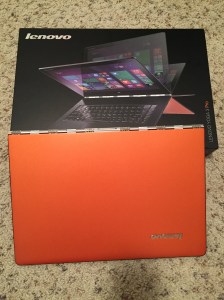
– It’s bright Orange
– Seriously, the whole laptop is orange from front to back
– Turns heads when used in public
– Beautiful super thin design
– The watch-band like hinge is solid
– The hinge is very flexible in any of the Yoga’s positions
– Responsive Touchscreen
– Super high resolution screen (3200×1800)
– Lots of screen real estate for geeky users
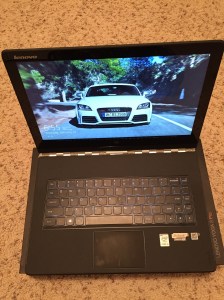
– Lenovo keyboard is crisp & makes for smooth typing
– Keyboard backlighting is soothing
– Rubberized material around keyboard is comfortable for constant touch
– No, it does not ship with SuperFish malware
– While no MacBook touchpad, the Yooga 3 Touchpad is the nicest I’ve seen on any Windows machine
– Charges up quickly
– No dearth of ports despite the thin design
– Yoga 3, while being a full-featured laptop, is exceptionally light
– Sleep & wake up are instantaneous
– Despite your doubts about the Intel Core M processor, performance is good under normal usage
– The iconic 360-degree fold-back Yoga hinge adds to flexibility of use
– Use it in laptop mode 90% of the time
– Reverse stand mode useful in planes as consumption device
Cons:
– Comes loaded with crapware, as expected from OEMs
– Almost enticing to install fresh Windows
– It’s not fanless & makes a slight whining noise at times
– Battery life under normal usage isn’t as great as the competition, but a decent 6+ hours
– Two finger tap to right click isn’t on by default & takes a registry edit to fix
– The display, while high-resolution and crisp, could use a tad more brightness
Overall, happy camper with the Lenovo Yoga 3 Pro. Recommended!



 Modern Developer Ramblings