Handling Authenticated Zip files in Windows Phone

This will be a short post on a little roadblock that was overcome.

To-Do:

An internal Windows Phone application that we are building for Sogeti needed to pull down a chunk of data from a server for caching & displaying on the phone.

Meh .. So, what’s the Challenge?

Well, two little issues:

  • The content was sitting behind a Basic Auth protection with Windows credentials.
  • The downloadable piece is a Zipped file with hierarchical content, that had to be unwrapped.

Problems with the usual suspects

  • For some reason, WebClient refuses to honor Header information attached, which contains the user’s credentials to clear the basic authentication. Yet to figure out why .. may be Fiddler would help.
  • The Zipped file was a red flag. Although pulled down as HTTPResponse, how do we unpack & parse content files?

The Solution

Turns out, the solution was quite simple & included right in the toolset itself. As we know, WebClient is an abstraction over HttpWebRequest and big brother does do a few things better, including honoring HTTP Header information correctly. And after looking around for 3rd party libraries to unzip the content, good ol’ .NET seemed sufficient to reach inside the zipped content to parse exactly what’s needed. Here’s some sample code:

                      
 HttpWebRequest request = (HttpWebRequest)WebRequest.Create(new Uri("https://someURI/File.zip"));

 byte[] credentialBuffer = new UTF8Encoding().GetBytes("UserID" + ":" + "Password");
 request.Headers["Authorization"] = "Basic " + Convert.ToBase64String(credentialBuffer);

 request.BeginGetResponse(r =>
 {
    var httpRequest = (HttpWebRequest)r.AsyncState;
    var httpResponse = (HttpWebResponse)httpRequest.EndGetResponse(r);

    using (var reader = new StreamReader(httpResponse.GetResponseStream()))
    {
        StreamResourceInfo info = new StreamResourceInfo(httpResponse.GetResponseStream(), string.Empty);
        StreamResourceInfo fileStreamInfo = App.GetResourceStream(info, new Uri("SomeFolder/SomeFile.txt", UriKind.Relative));

        StreamReader fileReader = new StreamReader(fileStreamInfo.Stream);
        string rawText = fileReader.ReadToEnd();

        Deployment.Current.Dispatcher.BeginInvoke(new Action(() =>
        {
           // Update UI with rawText.
        }));
     }
 }, request);

As you could see, we reached inside the hierarchical folder structure within the Zipped file & were able to pull out file content. And since this is read in as a byte stream, the content could be any type of file that could be read from the Windows Phone client. Voila!

Now, this technique has one weakness – you need to know the folder structure inside the Zipped file to pull out exactly the content you want. If your goal is to explore the unknown inside a Zipped file, this would obviously not work. Two solutions I came across for such scenarios are Silverlight SharpZipLib and SharpGIS Unzipper.

Hope this was helpful.

Adios!
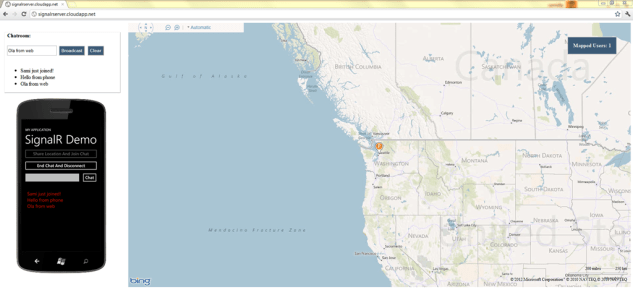
Windows Phone + SignalR = Awesome Possibilities!

I guest-blogged for SilverlightShow recently:

Windows Phone + SignalR combo in action!

Real-time communication. Many software applications on variety of platforms & form factors have a genuine need for it. But persistent networks, real-time connectivity & asynchrony continue to challenge us developers in building such applications. Is there a silver lining? Could we have near-real-time communication in our mobile apps? Imagine the possibilities.

SignalR is an async persistent connection library for client-server communication that aids in building real-time, multi-user connected applications across multiple platforms. In this article, we take a quick deep dive into SignalR usage and how to leverage this technology from a Windows Phone application. Real-time communication with a backend server on a personal device like the Windows Phone has potentially tons of ways to apply SignalR in Apps.

Full article with screenshots, code samples & downloadable source code can be found HERE.

All the other great SilverlightShow content on Silverlight, WPF, Windows Phone, Windows 8 & other related technologies can be found at http://silverlightshow.net. Cheers!

Adios

WPDev Sin: Lust

null This is the Day #7 & last post in the article series “7 Deadly Sins for Windows Phone Developers!“.

What is Lust ?

From http://deadlysins.com:

Lust is an inordinate craving for the pleasures of the body.

Why: Oh, please.

How does Lust relate to Windows Phone development ?

— excessive desires ..

Upfront, we’re not going try to map Lust in the true sexual sense, since that would be difficult & a slippery slope :). Let’s see how we Windows Phone developers can be wary against being over-zealous. Zest is good; craving without taking any appropriate action – not so much:

  • Bandwidth: Coming from a strong web background, we developers might end up blatantly using the user’s bandwidth. While rich content is good, we need to be aware that the phone is a mobile wireless device & not everyone is on an unlimited data plan. So, think twice when making data requests from the phone & have a solid caching strategy when possible. Use the DeviceNetworkInformation API to figure out state of network connections; may be we can do some heavy-lifting when appropriate (like data sync through ResourceIntensiveTasks while on WiFi).
  • Start-Up: While a dynamic flashy panorama/pivot home screen on your App may be a lucrative proposition, be aware of the cost. You only have a few seconds on the Splash page (if using one) before loading up the Home screen/MainPage. And while you can dummy up a Splash-screen-like pop-up on Home screen (like here), users usually do not want to wait too long. Consider using cached data from prior run of the App & indicate visually that you are fetching fresh data. And any time you are working with pop-up or login pages that you do not want to leave in page Backstack, make sure to clear them up.
  • Live Tiles: You desire your App to be like ones built by the cool kids. Don’t worry, we all do. One of the best favors you can do for your App is to support Live Tiles. This is one of the unique selling points of the platform, epitomizes Glance & Go and keeps inviting the user back into your App. Application Live Tiles or Secondary Live Tiles with backend support would be great; at the very least, you should consider presenting a slice of your App data as a local Secondary Live Tile.
  • Emulator Skins: We grew up knowing it’s not polite to stare, right? Yet when it comes to fancy new gadgets like smartphones, we openly drool .. and you know what, it’s ok :). Sadly, we live in a society of perpetual buyer’s remorse where newer electronics tickle our wallets every day. Now, fancy new Windows Phones will come up every now & then, which you may not be able to jump to given your contract cage. However, instead of drooling, you can go one step closer while you develop Apps for Windows Phone. Check out the cool Windows Phone Emulator Skin Switcher — choose between any one of 25 different Windows Phone skins. Or make one yourself. If you’re doing Windows Phone Dev on spare time, might as well make it a little fun!
  • Marketplace Woes: In the zest to get our dream App live in the Marketplace, we can all get trigger-happy in Marketplace submissions; but beware of these potential ingestion hiccups. Also, some newer Markets may have additional Certification obligations to meet local regulations .. check all details with the Application Certification Requirements. If you go with worldwide distribution, your certification time would be longer and your App will be subject to extra scrutiny. If you see failures, resubmit after fixing the issues or you could deselect the troubled Markets to get your App live in the Marketplace quicker.

Today is the last article in this series of “7 Deadly Sins for Windows Phone Developers!“. Apologies if the tone of anything I said sounded awkward .. by things “you” need to do, I really meant me. I simply wanted to document all the resources I want to keep in mind during my next Windows Phone app. Hope the articles were somewhat fun .. thank you very much for reading. Lot of good times ahead for us Windows Phone developers .. cheers to that.

Adios!