Recap on “Pragmatic Windows Phone Developer” talk @ FANUG

Last Tuesday, Aug 30th, I had the wonderful opportunity to head up a little north to Findlay OH and talk about Windows Phone development at the Findlay Area .NET User Group (http://www.fanug.org/). Thanks a bunch to @FANUG leader Brian Cobb (@brianjcobb) for having me over.

I thought we had very nice turn-out and hopefully I was able to get folks somewhat excited about Windows Phone & developing for it. We started out with some basics of why & where we are at with the Windows Phone platform and moved on to some demos. In retrospect though, since not many people had done Windows Phone development before, may be it would have been better to show some more basic stuff about Project templates & toolsets; guess something for me to learn & keep in mind. After the meeting, we headed out for the customary drinks at a local sports bar & had wonderful conversations over how the MSFT Surface should change the world etc. 🙂 In all, a great experience with a wonderful group of developers, with logistics working out perfectly. Thanks @FANUG!

My slides for the day can be found here.

Also, below are some useful links if you are looking to get started with Windows Phone Development:

  • Commercial home of Windows Phone is here. Learn about the phone, features, carriers, devices & upgrades.
  • For the Windows Phone Development SDK, head over here. The App Hub is also the one-stop portal for signing up with MarketPlace Registration & application submissions. It has a large number of links to very important resources & also an active forum for Windows Phone Developers.
  • Developer Resources on App Hub here.
  • Windows Phone Team Blog is here .. tons of news & great articles.
  • What is Mango & resources for developers here.
  • Lots of Windows Phone code samples can be found here.
  • Want to look around Windows Azure? Start here for a free trial or here to activate your Azure benefits from MSDN.
  • Home for OData is here .. learn about the technology, producers, consumers & SDK.


Thanks to everybody who attended. I hope to be in Findlay again sometime soon.

Adios!
Two quick Windows Phone Dev Tips

This will be a short post on sharing two little things I learnt while “Mangofying” one of my Windows Phone apps.

One:

We often use global placeholders/variables in your apps. These are usually defined in the App.xaml.cs and accessed throughout the project off of the App object. My good friend Travis Smith (@legomasternet) pointed out recently that a shortcut way to access these global variables is desirable through the use of static properties. Here’s how I did it in the most recent Windows Phone project:

 
        // This is defined in App.xaml.cs
        public static new App Current
        {
            get { return Application.Current as App; }
        }

        // Access anywhere else in Project as..
        App.Current.<Global_Variable> .. 

Two:

Considering using the Silverlight Windows Phone Toolkit in your project? If not, you should definitely take a look here .. this Toolkit is built by MSFT employees, notably the famous Jeff Wilcox. So, you can absolutely trust it & may be should not try to reinvent the wheel with features the Toolkit already provides.

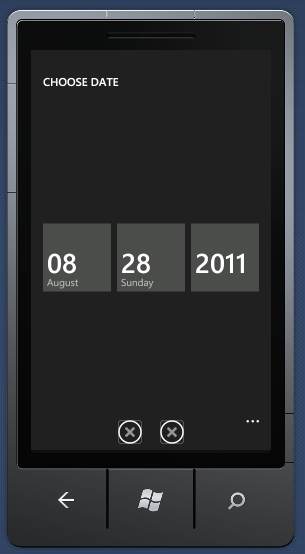
Now, two of the most common controls used from the Toolkit are the DatePicker & TimePicker; exactly what I was using it for. Now these two controls allow the user to pick a Date/Time in the default Windows Phone scrolling list fashion & essentially bring back a DateTime selection. Most of us will simply download the binaries of the Toolkit and add a reference to it in our projects to start using these controls. I did the same; but when I threw in the Date/Time Picker controls in my project, the full-screen pop-up looked like this:

Datepicker With Missing Icons


Notice the Accept/Cancel icons at the bottom are missing? Now, these are two standard icons that are a part of the official ApplicationBar Icon pack as found here and also downloaded when you got the Toolkit. They are not showing up on screen because the Toolkit code is not finding it where it’s looking for in your project structure. So, unless you want to get the source code for the Toolkit and change the configuration of where it looks for the icons, this is what is needed:

Toolkit.Content


As you can notice, the Toolkit code expects the icons to be in a special folder & with the above names. As always, do not forget to mark the icon images as “Content“.

That’s it! Hope this was helpful.

Adios!

Mobile Smackdown & recap on DevLink 2011

So, DevLink 2011 just wrapped up this Friday. For me, this was the first DevLink & hopefully many more to come. I found the conference to be rather well-organized, which regulars tell me should come as no surprise. I thought the Chattanooga Convention Center worked perfectly as venue with nice break-out rooms & plenty of space to stretch your legs. Almost every conference struggles to keep up with bandwidth-hungry geeks; so that little hiccup may well be overlooked. As for me, I drove down from Columbus & then back up. Yeah, it was long; but thankfully did not get stuck anywhere. A few friends came back with flight horror stories of connecting from ATL or DC; so in retrospect, wasn’t that bad a choice to drive.

I was going to attend this year, even if I didn’t have a speaking opportunity. However, the bonus was when Jeff Blankenburg (@jeffblankenburg) asked me to do the Windows Phone part of the now-famous Mobile Smackdowns that we are starting to see in many conferences. Essentially, the idea is to build a simple but fully-functional Twitter Stalker client in iOS, Android & Windows Phone back to back, and in 15 minutes each without using any toolkit or code snippets!! This sharp time limit is what makes it a nerve-wracking live coding experience. However, the idea is not a competition; but rather to give the audience a feel for what it is like to develop a simple application in various platforms.

So, how was the experience? The other two “victims” [as Ben calls us] were Ben Von Handorf (@benvonhandorf) for Android & John Baker (@iamthegeek) for iOS. I’m sure each of us had practiced a lot; but nothing compares to doing it live in front of a large audience watching every move, correcting mistakes & egging you on. And the best part is we are expected to talk the audience through what we are doing so that everybody has a sense of what’s going on. It’s a total adrenaline rush; but a lot of fun! I think we all did fairly well and our respective apps were functional by the end of 15 minutes. I had the additional onus of doing the WP7 part well, since I personally believe our development tools are just fantastic. Think I finished the last line of code in the dying seconds .. phew! My personal recommendation if you are doing a smackdown like this — in practice, you need to get your time down to about 10 minutes to have a decent chance of finishing the app when infront of an audience. If interested to see the Windows Phone Twitter app I tried to build, the source code may be found (here). I would always appreciate any feedback on how the process could be streamlined or how we can make the Mobile Smackdowns even more fun! Thank you for all the support & encouragement.

DevLink was also wonderful in connecting with lot of folks I talk to a lot, but don’t see very often. It was great to see people like Michael Crump, Jeff Fansler, Sarah Dutkiewicz, Michael Wood, Jeremy Likness, David Giard & Richard Dudley — all of whom are technical honchos in their respective areas. So, I always learn a lot from them and have great conversations. So, in all, great conference, awesome people, superb presentations & priceless discussions. Cheers for DevLink & looking forward to next year!

Adios!

PS:
Ben’s write-up on the smackdown is here.
John’s iOS code is here.